
Safe Keys, a free Claude Code plugin
Paste an API key into Claude Code. Nothing keeps it.
Not the chat, not the transcript on your disk, not the screen, not the model. The key becomes a name the moment you press Enter, and your tools still get to use it.

How it works
You paste a key once. Everything else sees a name.
I built it the day I pasted a Bright Data key into my own session and watched the redactor I had at the time miss it. The miss is written up in the repository, and the fix is tested against that exact shape.
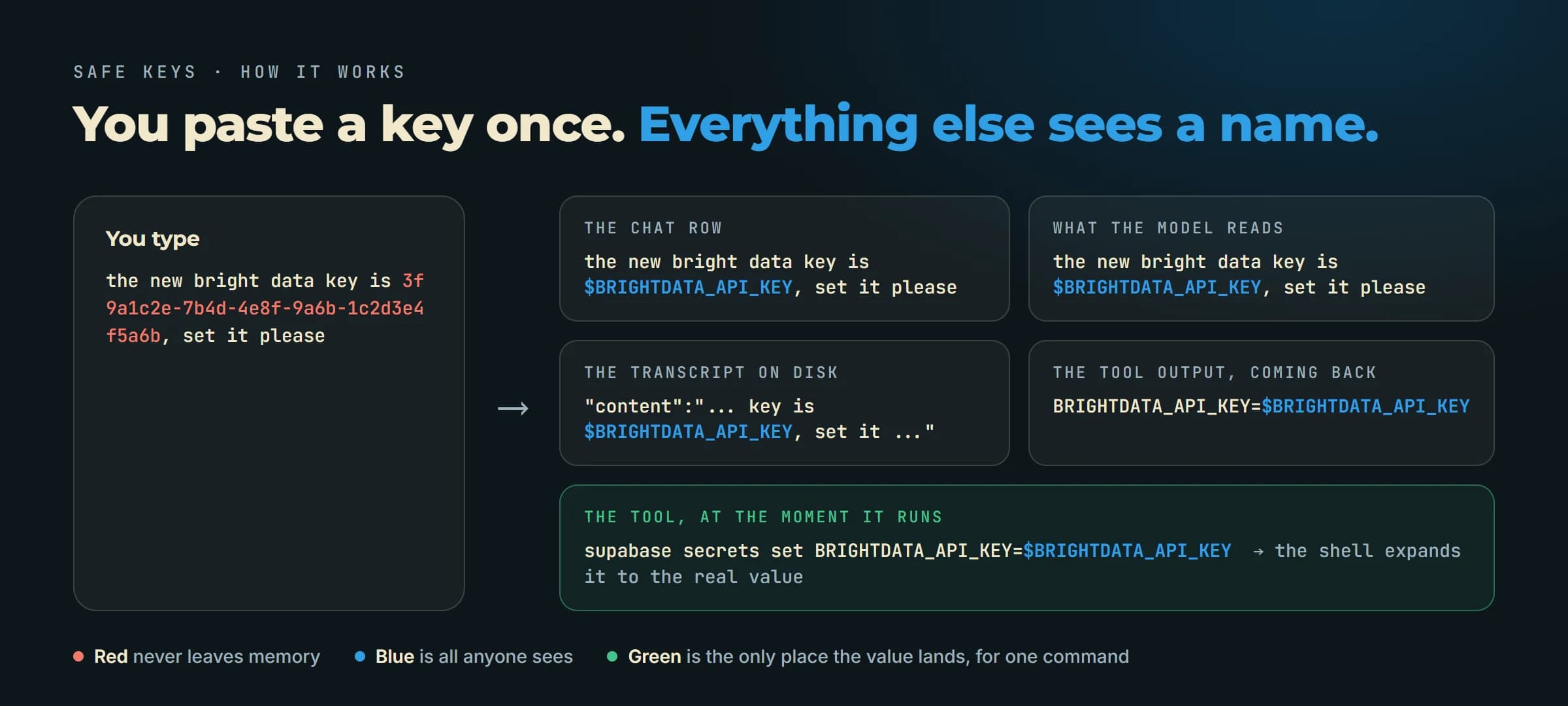
| Where a key could land | What Safe Keys does |
|---|---|
| The prompt box, on paste | Replaced before the text is queued or drawn. |
| The message the model reads | Replaced before it enters the session. |
| The transcript file on disk | Every stored row is rewritten before it is written. The two records that are not rows are overwritten in place a few seconds later. |
| Bash and PowerShell commands | $NAME is a real environment variable, so the shell expands it and the command never carries the value. |
| Every other tool | The value is substituted into the arguments at the moment the tool runs. |
| Tool output coming back | Stored values become names again. A key a tool prints, from a cat .env say, is stored and named too. |
| The screen | Every drawn row is scrubbed on the terminal, the desktop app, VS Code and mobile. |
Real values live in the plugin's memory for the length of the session, and nowhere else. Nothing is written to a store, a file or the network.
Install in two steps
One setting, one clone, and the next session is covered.
Step 1 of 2
Turn on function hooks
Safe Keys is a function hook plugin, an early access surface of Claude Code. One line in your settings file switches it on, once.
Open ~/.claude/settings.json (it is in your home folder) and add the env block. If an env block is already there, add the one key inside it.
settings.json{ "env": { "CLAUDE_CODE_ENABLE_FUNCTION_HOOKS": "1" } }
Step 2 of 2
Put the plugin where Claude Code loads skills from
Claude Code loads any plugin that sits in ~/.claude/skills. One clone and the next session has it.
Run the clone. Claude Code reads the folder on its next start.
Clonegit clone https://github.com/markfulton/safe-keys ~/.claude/skills/safe-keysOptional, before the first session: ask Claude Code to check that your build reads the plugin.
Validateclaude plugin validate ~/.claude/skills/safe-keysOpen a new session. The first line says Safe Keys is on. Paste a key and watch the row change to a name.
Read before you trust it
What it does not do.
A typed key is caught at Enter, not per keystroke.
Pasting is covered in the box. Typing a key character by character is caught the moment you submit.
Single quotes get the value.
No shell expands a variable inside single quotes, so there Safe Keys puts the value itself in. Double quotes are the clean path and what the model is told to use.
Detection is heuristic.
Thirty-eight key shapes by name, labels like KEY= and Bearer, a credential word near a token, and a bare high-entropy token. A short custom secret with none of those is not caught. Use the inbox for it.
Function hooks are early access.
The contract can change between Claude Code releases. claude plugin validate tells you before a session does, and the plugin logs what it could not do.
Rotate anything you already pasted.
The plugin protects the next paste. A key that reached a transcript before the install was exposed from that moment, and the clean-up removes the record, not the exposure.

Built in the same place
8 AI Employees, open source, on the same agent.
Scheduled routines that cover a whole business role, free on every plan. Safe Keys is one of the small tools that came out of running them.
Questions
Not sure which job to hand an agent first? Run the free Agent Opportunity Scan.